

Your website, your way.
Pandao CMS runs professional websites: pages built block by block, a blog, widgets, forms, media and menus, in as many languages as you need, with an administration that stays simple and a security built in. Extensions add what your business needs.
- Pandao CMS 8.4.1
- PHP 8.2 – 8.5
- MySQL 5.7+ · MariaDB 10.3+
- Responsive · Multilingual · RTL

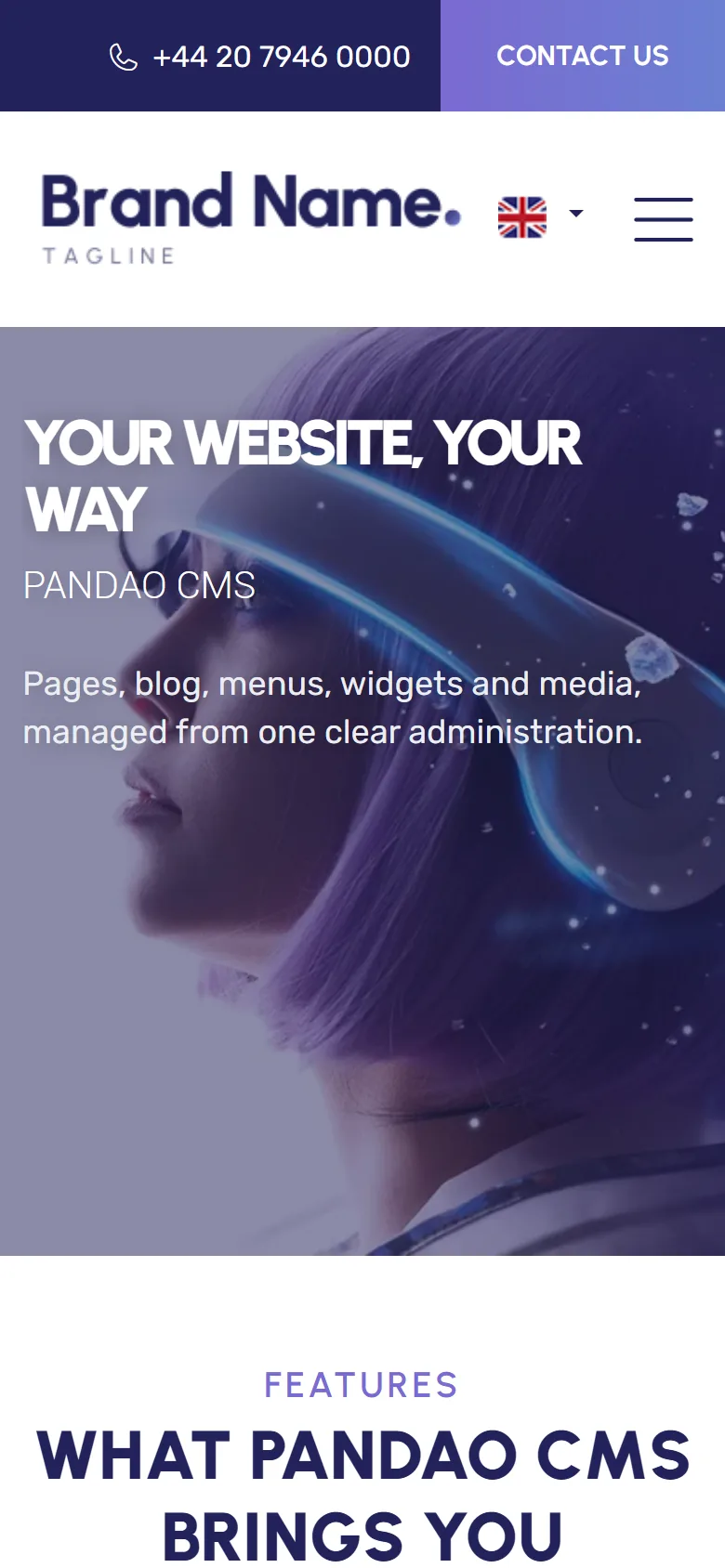
Thank you for choosing Pandao CMS
This guide takes you from the upload of the files to a site of your own, then through every screen of the administration. It is written for site owners as much as for web developers: no coding is needed to run a site, and the last chapters are there for those who want to go further.
Pandao CMS manages the website itself: pages, articles, menus, widgets, media, forms, languages, users and e-mails, with a responsive theme. Its extensions add whole features without touching its code, as Multi Resorts and Panda Resort add a hotel booking engine, for several hotels or for one.
If a question is not answered here, the troubleshooting section and the Diagnostic screen of your administration solve most issues in minutes. For anything else, our support is happy to help: include the report of the Diagnostic screen, it tells us everything about your server without any password.
Everything a website needs
What a professional website needs, in one administration, without plugins to hunt for.
Simple to manage
Pages, articles, widgets and slides edited in the same clear forms, with a tab per language and a draft kept as you type.
A page builder
Compose a page with containers, columns, texts, images, videos, buttons and cards, by drag and drop, then edit each block in place.
Widgets everywhere
Slideshow, banners, parallax and video backgrounds, article grids, testimonials, contact details: placed on every page or on the ones you choose.
In every language
Each page, article, widget, menu and e-mail in each language of the site, right-to-left ones included, with a language selector.
Forms without code
Build a form field by field, place it in any page with a shortcode, receive the answers by e-mail and keep them in the administration.
A media library
Folders, images resized for every screen with a lighter WebP copy, and the point of each image kept in view when it is cropped.
Found by search engines
Clean addresses, titles and descriptions, canonical and hreflang tags, a sitemap, and old addresses redirected when they change.
Secure by design
Protected forms, strict security headers, modern password hashing, limited login attempts, a cookie banner with “Reject all”.
Extensions
Modules, pages, widgets, settings and scheduled tasks added by extensions, which install and update in one click.
Your brand
Your logo and your two colours set in the settings, and a child theme for deeper changes that updates never overwrite.
Made for phones
Every page of the website and of the administration works on a phone and a tablet.
A Diagnostic screen
PHP, database, server and scheduled tasks checked for you, with a report to join to a request for support.
New in version 8
Version 8 is a new generation of Pandao CMS for PHP 8.2 to 8.5: hardened, extensible, and easier to use every day. See Upgrading from version 7 before you move a site.
| Area | Version 7 | Version 8 |
|---|---|---|
| Platform | PHP 7 and 8 | PHP 8.2 to 8.5, MySQL 8 and MariaDB, libraries installed, no Composer needed |
| Security | — | Rewritten routers, prepared queries, protection against forged requests, security headers, limited login attempts, errors logged but never shown |
| Extensions | — | An Extensions page: modules, pages, widgets, settings, roles and scheduled tasks added by extensions, with their database updates |
| Content | Pages and articles | Page builder, form builder, popups, media library with folders and focal points, trash, drafts kept as you type, editing locks |
| Website | Font Awesome, sample content in lorem ipsum | Widgets in any position, right-to-left languages, cookie banner with “Reject all”, privacy policy page, open-licence icons and photos, real sample texts |
| Administration | — | Menu in sections, Diagnostic screen, lists with filters by owner, seven languages of the administration |
| Moving a site | — | Import of a version 7 site in a few clicks: content, accounts, media and settings, with their addresses |
Live demo
The online demo runs this very version with the sample texts of the package. Its photos are shown for preview only and are not included: the package comes with its own sample photos, under the CC0 licence.
The administration of the demo is read-only, and what visitors create (comments, messages) is visible to other visitors and deleted every night. Do not type real personal details.
Requirements
Pandao CMS runs on most shared hosts, VPS and managed servers. Once it is installed, the Diagnostic screen checks every point below on your own server.
| Component | Needed | Advised |
|---|---|---|
| PHP | 8.2 to 8.5 | 8.3 or 8.4 |
| PHP extensions | curl, dom, fileinfo, gd, mbstring, openssl, pdo, pdo_mysql | intl, so that dates are written in the language of each page |
| Database | MySQL 5.7 or MariaDB 10.3, with the utf8mb4 character set | MySQL 8 or MariaDB 10.6 and later |
| Web server | Apache 2.4 with mod_rewrite and .htaccess files allowed, or IIS with URL Rewrite (web.config included) | nginx in front of Apache, as on Plesk and many cPanel hosts, works as it is |
| Secure connection | — | HTTPS on the whole site (a free certificate from your host) |
| PHP memory | 128 MB | 256 MB |
Package contents
The main file downloaded from CodeCanyon holds this documentation and the website, ready to upload. The PHP libraries are already installed: you do not need Composer.
pandao-cms-8.4.1/
├── documentation/            this documentation: open index.html
└── upload/                   the website: upload the contents of this folder
    ├── admin/                the administration (www.your-site.com/admin)
    ├── bin/                  command line: scheduled tasks and extensions
    ├── config/               the configuration, written by the installation wizard
    ├── extensions/           the extensions you add
    ├── public/               public files: media, brand images
    ├── setup/                the installation wizard
    ├── templates/default/    the theme of the website
    ├── vendor/               PHP libraries
└── common/, core/, … Pandao CMSInstallation
Allow about five minutes.
- Create a database
In your hosting panel (MySQL Databases in cPanel, Databases in Plesk), create an empty database with the
utf8mb4character set, and a user who has every privilege on it. Keep its name, its user, its password and its host (oftenlocalhost) at hand. - Upload the files
Upload the contents of the
upload/folder to the web root of your domain (oftenpublic_html/orhttpdocs/), or to a sub-folder such aspublic_html/site/. The quickest way is to upload the zip with the file manager of your host, extract it there, then move the contents ofupload/into place. With an FTP client, make sure the hidden.htaccessfiles are sent too. - Run the installation wizard
Open the address of your site: the wizard starts by itself. Give the title of the site, its public address (
https://www.your-site.com, without a slash at the end), the e-mail address that receives the notifications, the login and password of the administrator (12 characters at least), then the details of the database. Click Install.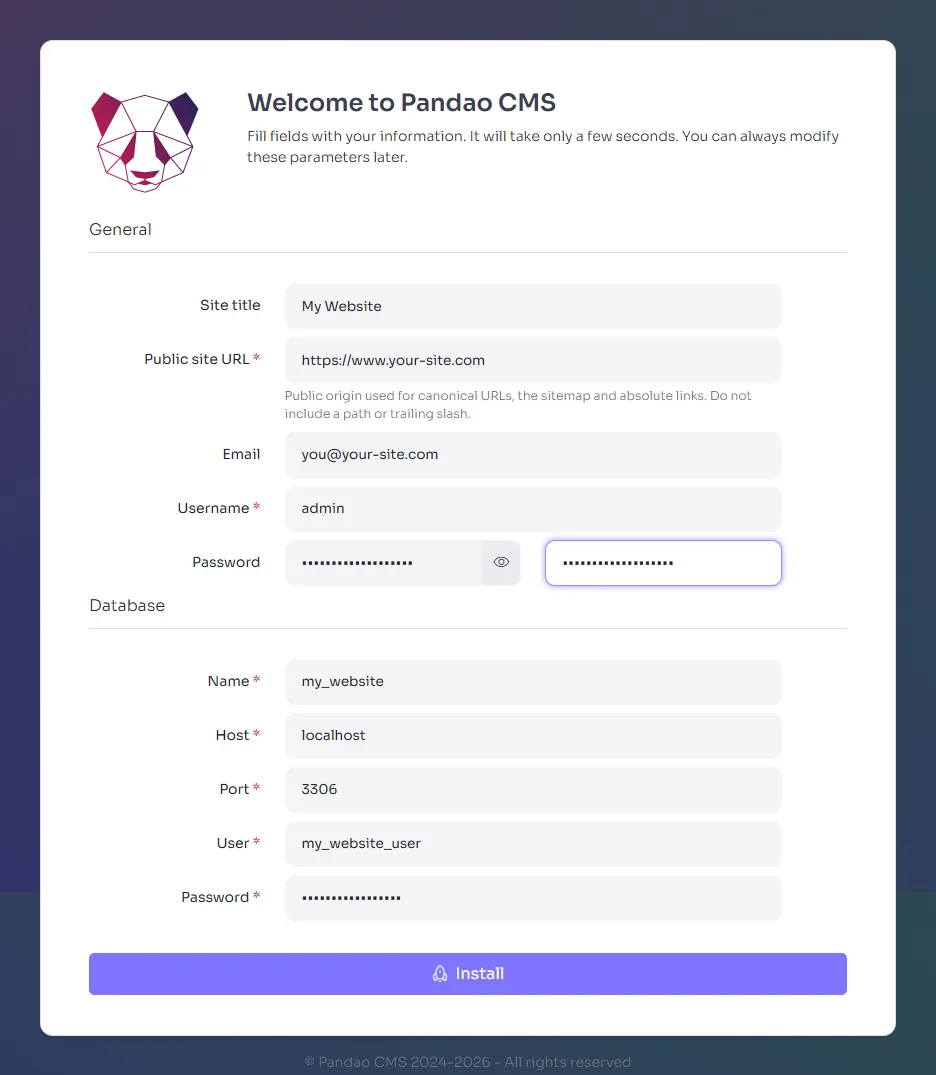
The wizard writes
config/config.phpandpublic/robots.txt: PHP must be allowed to write inconfig/andpublic/while it runs, which is the case on most hosts. - Log in
Click Log in and sign in with the administrator account: the dashboard opens, and your site is ready to be made your own.
The site works in a sub-folder and on a sub-domain: its base path is found by itself. The administration is at https://www.your-site.com/admin/.
Once the site is installed, the wizard locks itself. You can still delete the setup/ folder and remove the write permission on config/config.php, two good habits on a live server.
Sample content
A new site does not open on an empty page: it shows what each block can do, in English, French and Arabic, ready to be replaced by your own words.
The home page
A slideshow of two slides, a list of features, a featured article, an advertising banner, cards of articles, a full-width banner, a video background and a parallax section, then the footer: contact details, navigation and an “About us” text.
The pages
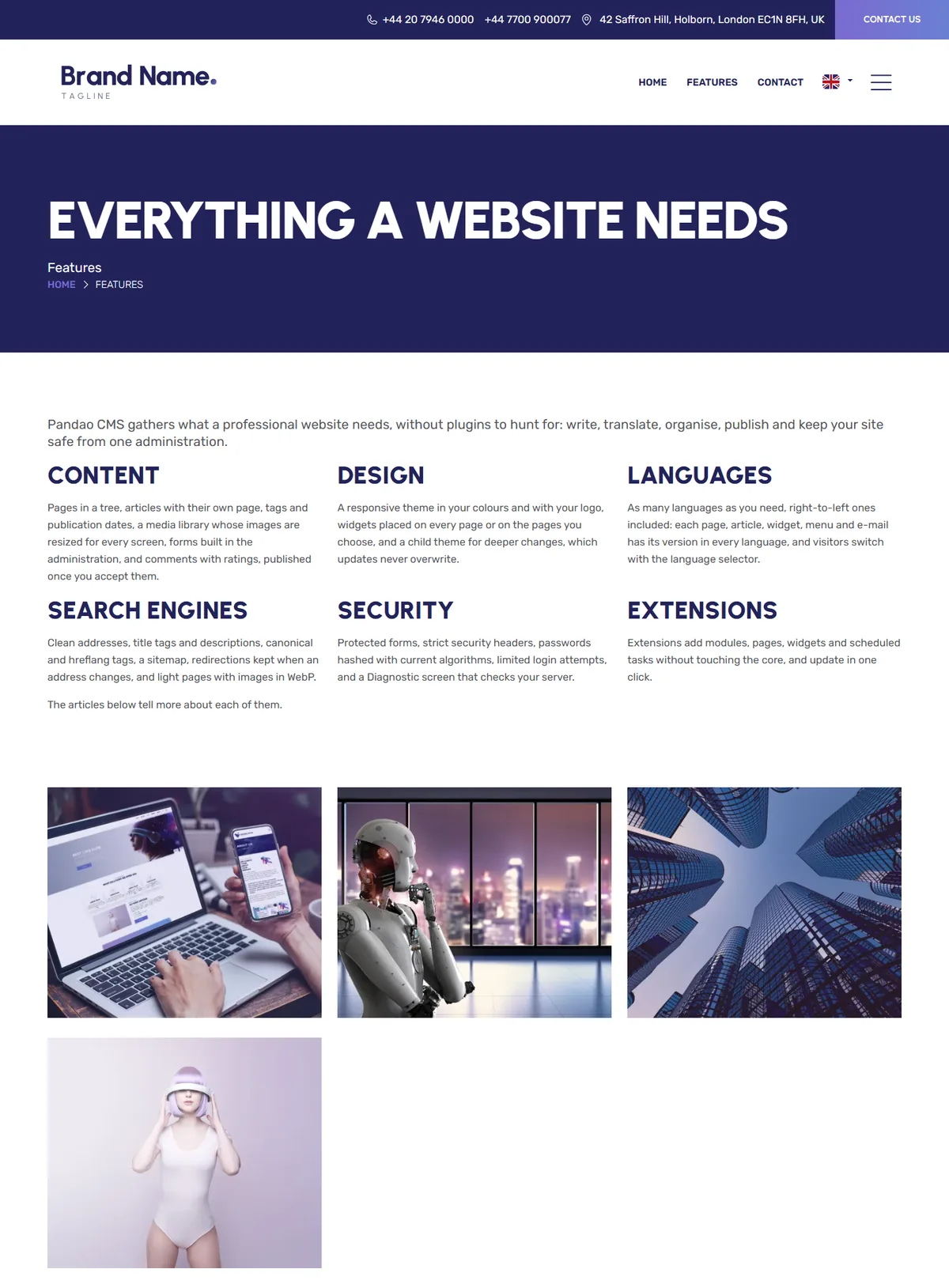
A Features page built with the page builder, with four articles; a Contact page with its form and its map; Legal notices and a Privacy policy to complete; a blog, a search page and a “Not found” page.
The photos are under the CC0 licence and the video is in the public domain: you may keep them on your site. Every sample is edited or unpublished like any content. The site shows its English version until you turn on Enable foreign languages (see Languages & texts).
Launch checklist
The settings to review before you open your site, in the order that saves time.
- General settings
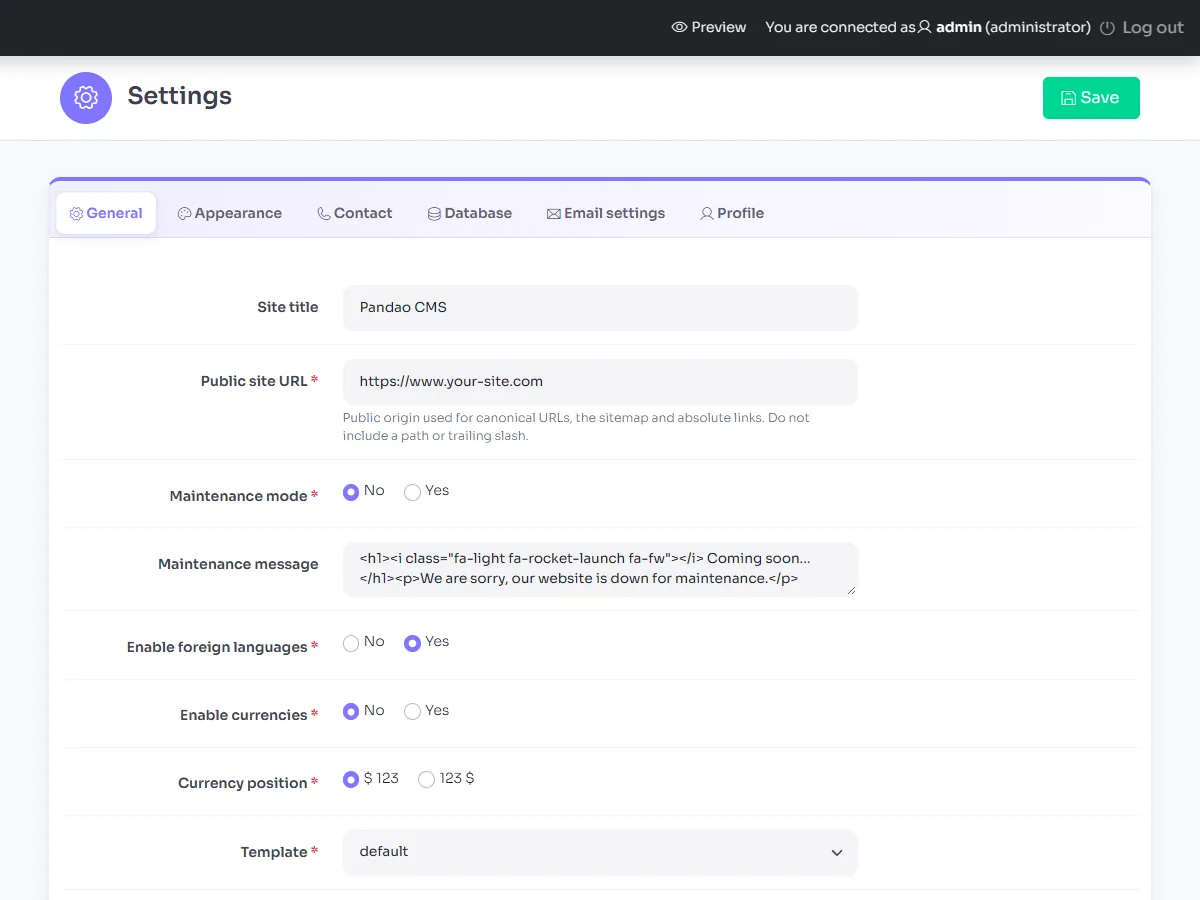
Settings › General: title of the site, public site URL, time zone, date and time formats, the languages (Enable foreign languages) and the template.
- Contact details and e-mails
Settings › Contact: name, address, phones and e-mail of your company, shown in the header, the footer and the contact page. Settings › Email settings: the sender, and the SMTP server of your mailbox for a reliable delivery.
- Your brand
Settings › Appearance: logo, footer logo, e-mail banner, favicon and brand colours. See Branding & theme.
- Your content
Replace the sample texts and photos, page by page: the home page and its widgets, the Features page, the articles and the footer.
- Your legal pages
The Legal notices and Privacy policy pages hold model texts: complete the passages between brackets.
- The anti-robot check
Create reCAPTCHA v3 keys on google.com/recaptcha and paste them in Settings › General (Captcha: public key and secret key): the contact form, the forms, the comments and the sign-up form are then checked. v2 keys, with a checkbox, do not work: every check would fail.
- Your users
Change the password of the administrator if needed, and create an account for each person who edits the site, with the right role (Users & roles).
Upgrading from version 7
Version 8 is a new generation: its database has new tables and columns, its administration new screens, and its theme new widget positions. It is installed as a new site beside your version 7 site, then imports its content in a few clicks. The old site is only read: it keeps working until you switch.
- Back up
The files and the database of your version 7 site.
- Install version 8
Follow the installation in a folder beside the old site, on the same hosting (a temporary sub-domain is ideal), with a new, empty database: never reuse the one of the old site.
- Import your site
In Settings › Database, click Import a Pandao CMS 7 site. The sites found beside the new one are offered: choose the old one, or type its folder, the one that holds its
configfolder. The screen lists what it holds; tick the confirmation, click Import, and keep the page open until the report, usually within a minute. - Read the report
It lists what is left to do: set your brand colours, look again at the pages whose layout you had changed in the theme of version 7, complete the privacy policy page that was added. Then browse the new site.
- Switch the domain
Point your domain to the folder of the new site, and update the Public site URL in Settings › General.
The import takes the languages, pages, articles, menus, widgets, slides, media library, comments, messages, popups, texts, e-mails and accounts of the old site, the files of its media, its logos and its settings. Each page and article keeps its address, so that links and search rankings follow, and each account its password. What version 8 adds is kept, in your languages: its new texts and e-mails, the privacy policy page and the slideshow widget. The content of the new site is replaced; its administrator account stays.
The import also runs from the command line, handy for a large site: php bin/pandao import:v7 /path/to/old-site shows what it holds, and --run imports it. An import stopped on the way resumes where it stopped.
Keep the old site and its database offline for a few weeks. If you need help, our support answers.
Updating
New versions are published on CodeCanyon, in your Downloads, with their notes in the changelog.
- Back up
The files and the database of the site.
- Upload the new files
Upload the contents of the
upload/folder of the new package over your site. Your configuration (config/config.php), your media and your brand images are not in the package: they are kept. Changes made to the theme belong in a child theme (see Customisation), so that an update never overwrites them. - Apply the updates of the extensions
When an extension receives new files, every screen of the administration shows a banner with its new version and an Update now button (also offered in Extensions). Click it when the upload is complete: its database is brought up to date in a few seconds. Until then, its pages tell your visitors that the site is being updated, with a code that search engines read as temporary.
The administration
Everything is managed from https://www.your-site.com/admin/, on a computer, a tablet or a phone.
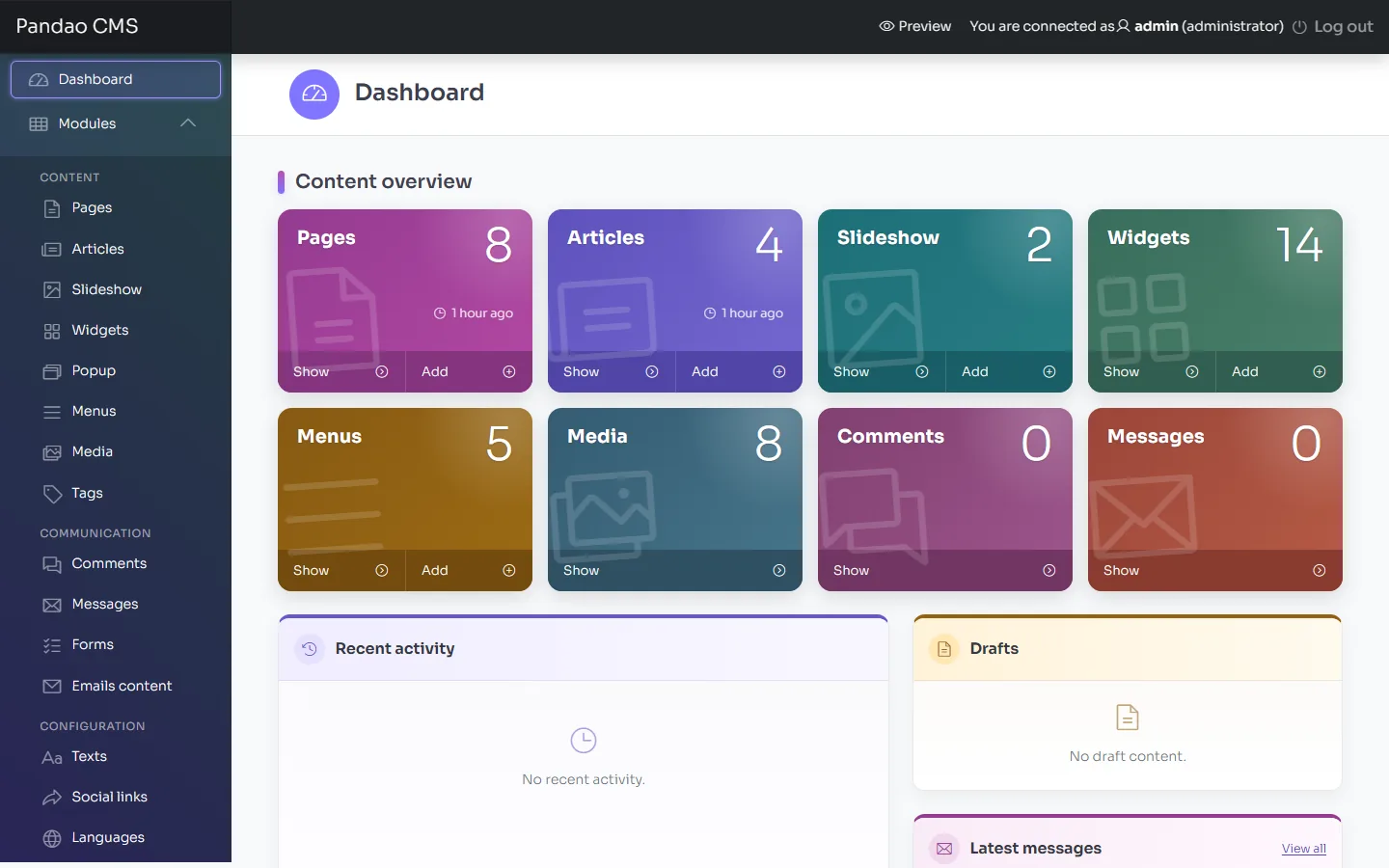
The menu on the left groups the modules in sections: Content (pages, articles, slideshow, widgets, popups, menus, media, tags), Communication (comments, messages, forms, e-mail templates) and Configuration (texts, social links, languages, locations, currencies, users). Each extension adds its own section. Settings, Extensions, Diagnostic and Trash sit beside them.
Every module has a list, with a search, filters, sorting by drag and drop when the order matters, and actions on several items at once (publish, unpublish, delete), and a form, with a tab per language for what is translated.
Pages & page builder
The pages form the tree of your site: each has its place, its model, its address and its text.
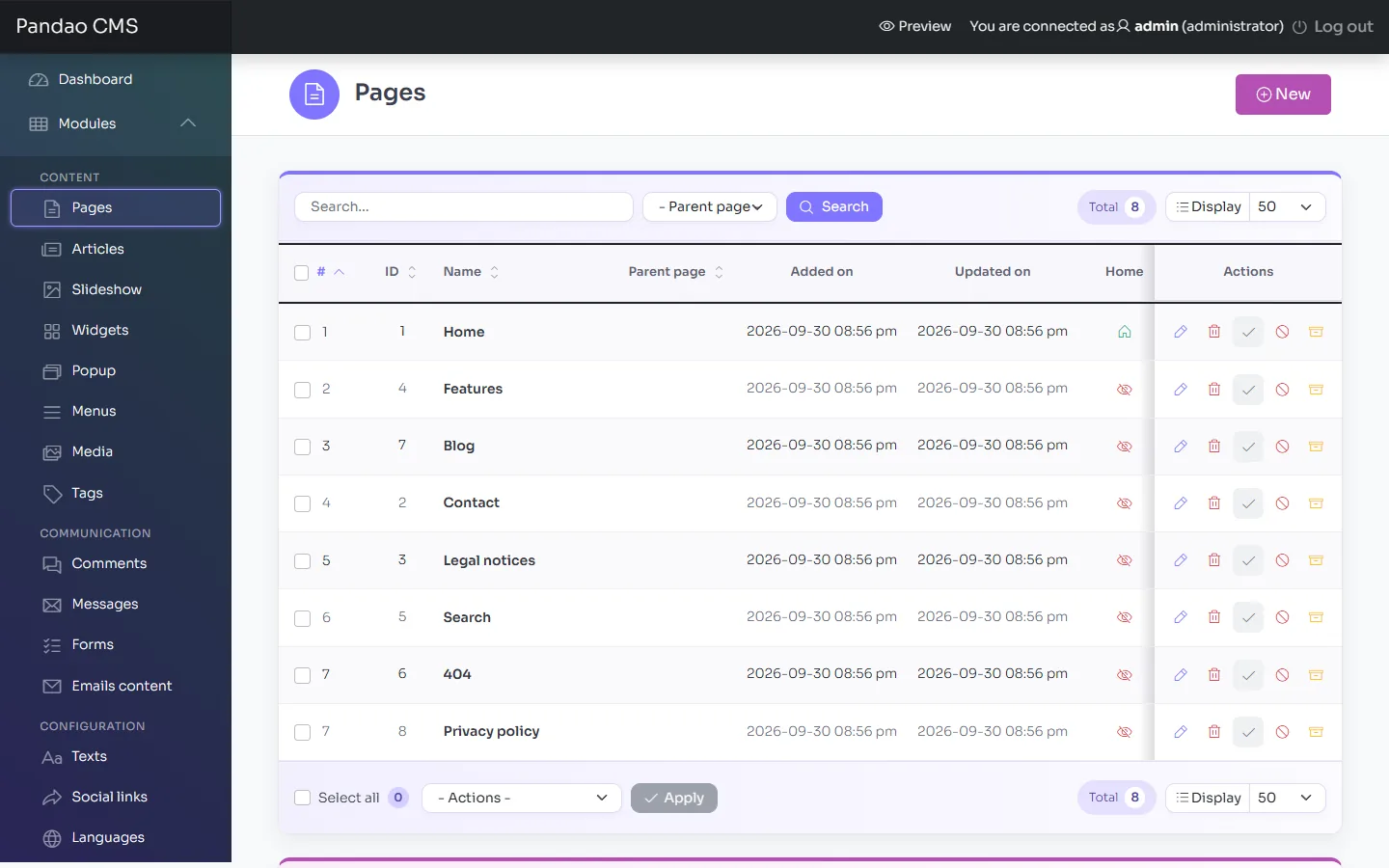
- Model: the layout of the page. page shows the text of the page builder, home the home page, blog a list of articles, contact the contact form and the map, privacy the privacy policy, search the search results, 404 the “Not found” page. Extensions add their own models.
- Parent: the page it belongs to, for the tree, the breadcrumb and the menus.
- Alias: its address (
/en/features), Title tag, Description and Robots for search engines. - Images and files: the photo of the header of the page, a gallery of two images or more, and documents to download.
- Comments and ratings, turned on page by page.
The home page of the site has a green house in the Home column of the list. To make another published page the home page, click its grey house: it takes the place of the current one, and the site always keeps a single home page.
The page builder
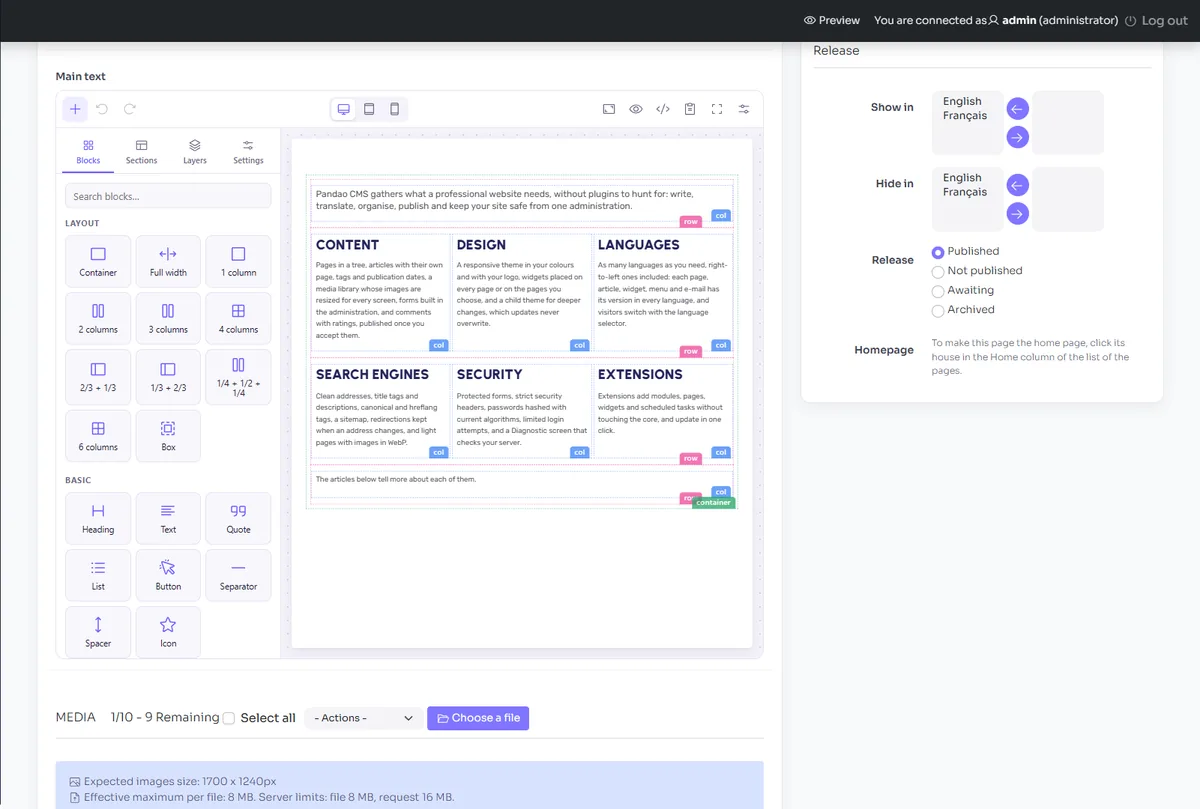
The text of a page is composed with PageFlow 2, the page builder, which shows the page as your site shows it, on a computer, a tablet or a phone. Drag blocks from the left panel (containers, rows of columns, headings, texts, buttons, images, videos, maps, icons, cards, accordions, tables…) or whole ready-made sections, then write in each block. The panel on the right holds the settings of the selected block: margins, colours, visibility, and column widths for each screen size. Layers shows the outline of the page, blocks can be copied and pasted, even into another page, and a picture you drop or paste into the page is saved to the media library. Pages made with the previous page builder open as they were.
A form built in Forms is placed in a page or a widget with its shortcode, such as [form id="quote"].
Articles & blog
Articles are the news, posts and stories of the site. Each article belongs to a page, which lists it (a blog page, or any page), and has its own page too.
- A summary for the lists and the cards, a text, photos and files.
- Tags (Content › Tags), which become filters above the list of articles.
- Publication and end dates: an article appears and disappears on its own.
- Home: the article is featured on the home page, by the Featured articles widgets.
- Comments and ratings, article by article.
Slideshow & widgets
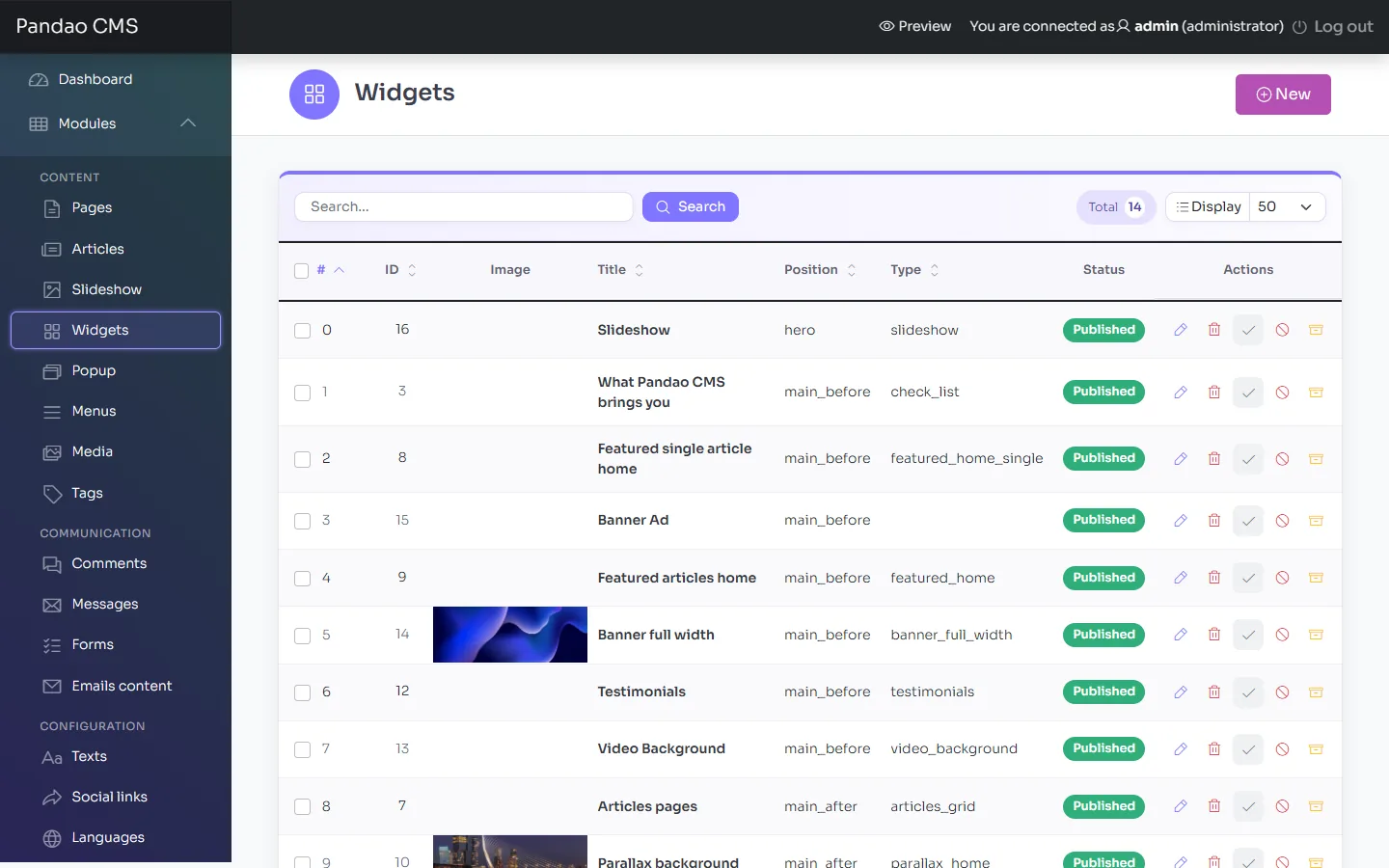
The blocks of the pages are widgets you place, order, translate and hide in Content › Widgets, without touching any code.
Widgets of the theme
Slideshow, full-width banner, parallax background, video background, list with icons, featured article, featured articles, latest articles, article grid, image carousel, testimonials, Google reviews, contact information, list of pages, footer menu, and your own HTML content.
Where they go
Each widget has a position (top of the page, before or after the main content, left or right column, columns of the footer), its pages or all of them, its order and its languages. Extensions add their own widgets.
The slides are edited in Content › Slideshow: an image or a YouTube video, and a text with its title, in each language. On the home page, the title of the first slide is the main title of the page for search engines.
Media library
All the images and files of the site, in folders, in Content › Media, and from the text editor.
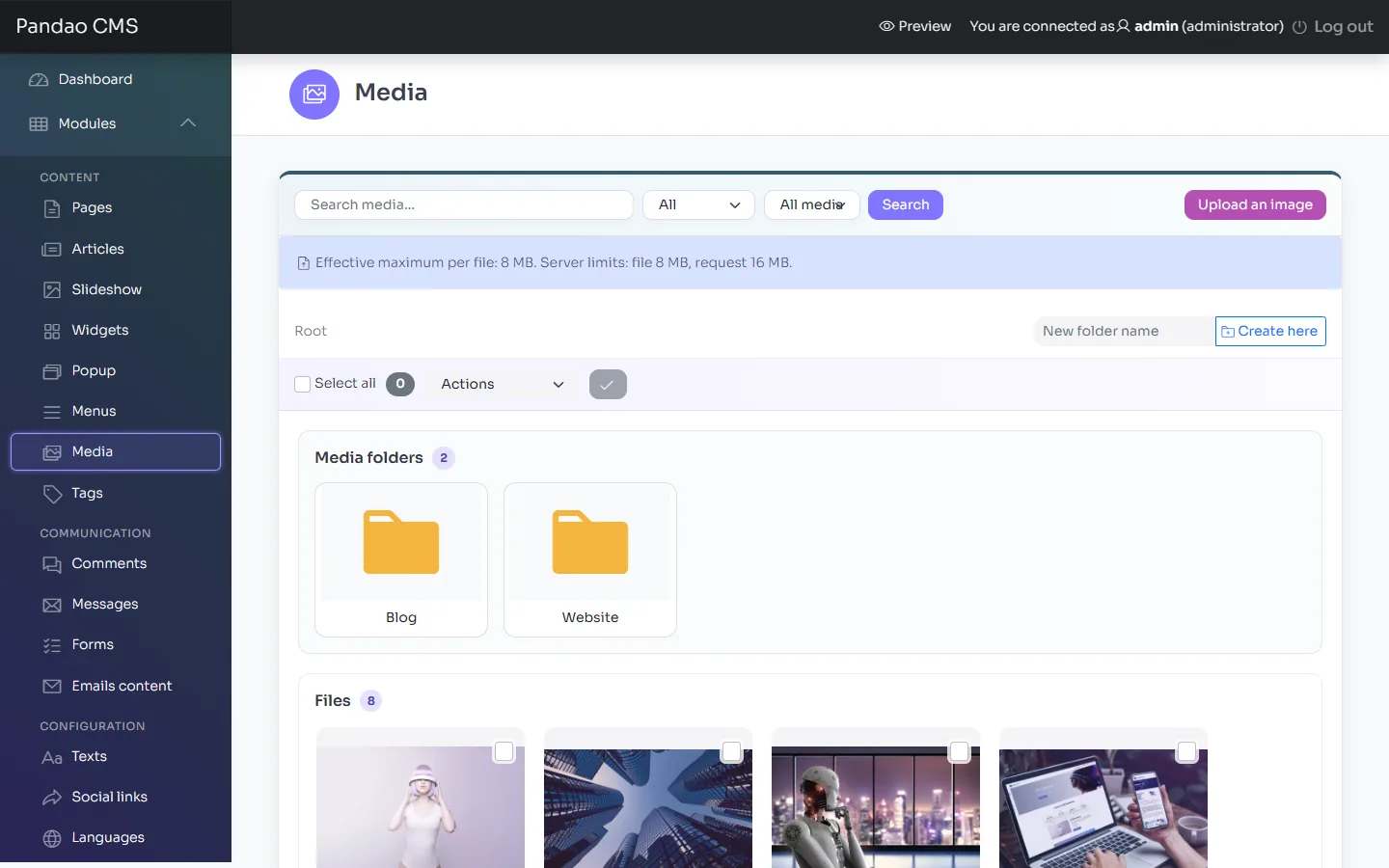
- An image is resized for phones, tablets and computers, and receives a lighter WebP copy, served to the browsers that read it.
- The focal point of an image keeps its subject in view when it is cropped to fit a block.
- Replace a file keeps its address: the pages that use it show the new version at once.
- The images of a page, an article, a slide or a widget are uploaded in its form, with their label (the alternative text read by search engines and screen readers).
Popups
A popup (Content › Popups) shows a message over the page, once per visit: an announcement, an offer, a closing notice. It has its text in each language, its background colour, its pages or all of them, and its publication dates.
Forms & messages
Build the forms you need, field by field, without code: a quote, a registration, a survey.
- Create the form
In Communication › Forms: its title, its identifier (used in the shortcode), the addresses that receive the answers, whether the answers are kept in the administration, the subject of the e-mail, the label of the button and the message shown once it is sent.
- Add its fields
Text, e-mail, phone, number, date, long text, list, check boxes or radio buttons, with their label, their placeholder and whether they are required, in each language.
- Place it
Paste its shortcode, such as
[form id="quote"], in a page or a widget.
The messages of the contact page and the answers kept are listed in Communication › Messages. Forms are protected against robots by reCAPTCHA when its keys are given, and limited per visitor.
Comments & ratings
Turn on the comments, and the ratings, in the form of a page or an article. A comment waits in Communication › Comments until you publish it. The published comments with a rating of a page are shown by the Testimonials widget of that page.
E-mails
Every e-mail of the site is a template of Communication › Emails content, in each language, with variables such as {name} or {site_url} replaced when it is sent: the confirmation of an account, the request of a new password and the password itself, a message of the contact page. Extensions add their own templates.
The e-mails carry the banner of Settings › Appearance, and are sent through the SMTP server of Settings › Email settings when you give one. Microsoft 365 with OAuth needs the league/oauth2-client library, installed with Composer. A sender address of your own domain, and the SPF and DKIM records of your domain set with your host, help delivery a lot.
Languages & texts
Offer your site in as many languages as you need, right-to-left ones included.
A new site comes in three languages: English (the main one), French and Arabic, with every sample written in each. Arabic lets you try a site that reads from right to left straight away. Only English shows until you turn on Enable foreign languages; to drop a language you do not need, unpublish or delete it in Configuration › Languages.
- Turn on Enable foreign languages in Settings › General: the language selector appears in the header, and the addresses carry the language (
/en/…,/fr/…). - In Configuration › Languages, publish or add a language: its name, its code (
de), its locale (de_DE), its flag and, for Arabic or Hebrew, right to left. Each content receives a copy to translate, in the main language, except in French and Arabic, where the samples and texts you have left unchanged arrive already translated. - Translate the content in each form (a tab per language), then the interface: Configuration › Texts for the texts of the website, and Communication › Emails content for the e-mails.
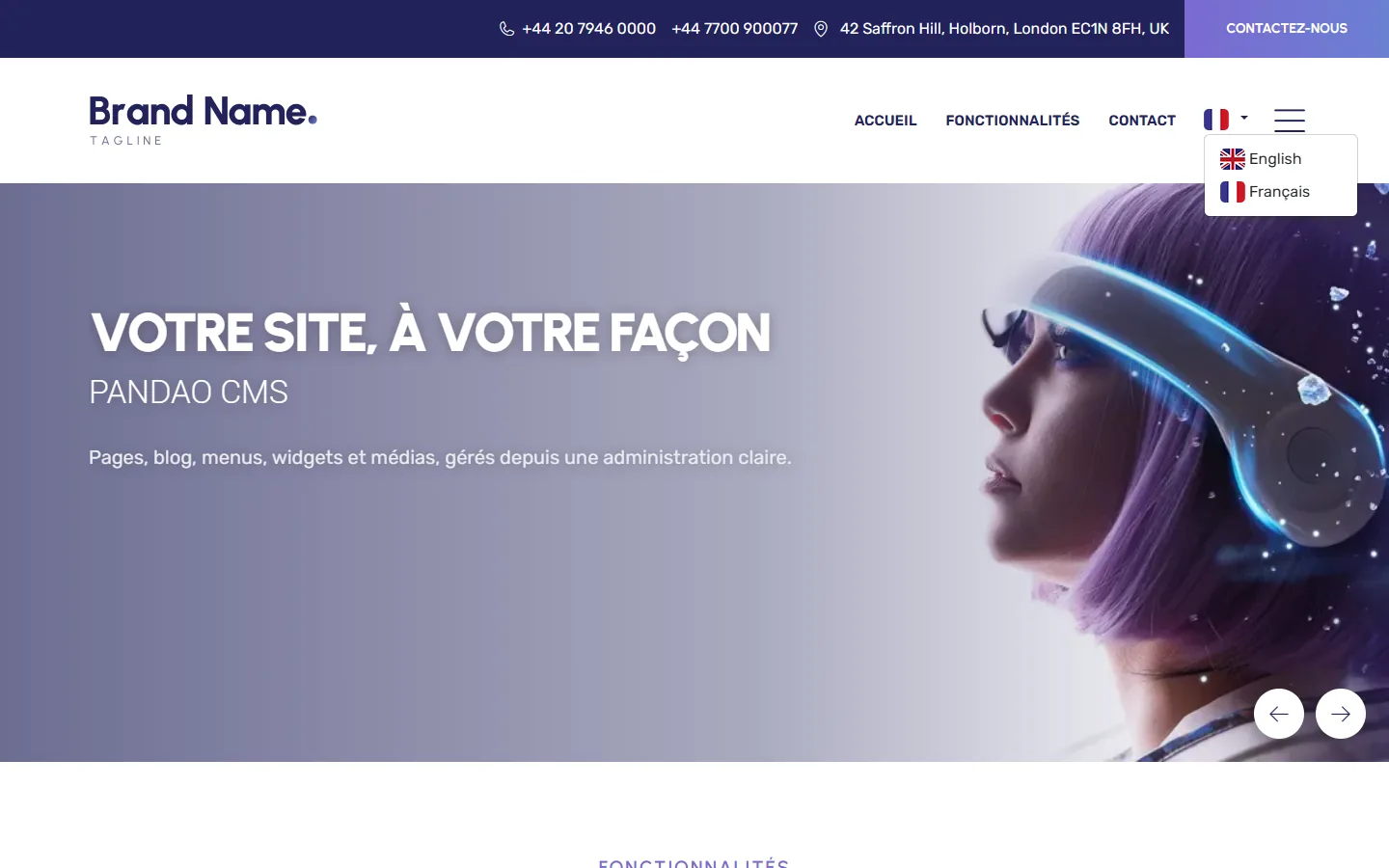
In a right-to-left language, the whole website is mirrored: menus, carousels, forms and buttons. The administration is available in English, French, Spanish, Portuguese, Dutch, Russian and Turkish, chosen in Settings › General (Admin panel language).
Users & roles
In Configuration › Users, each account has a role:
| Role | What it does |
|---|---|
| Administrator | Everything, settings, extensions and users included. |
| Manager | The content and the communication of the whole site. |
| Editor | The content of the site, according to the permissions of each module. |
| Registered | A member of the website, with its account page when the site offers one: no access to the administration. |
Extensions add their own roles, with the only permissions they need. Each user changes their name, e-mail and password in Settings › Profile.
Branding & theme
Your logo and your colours, without editing a file: Settings › Appearance.
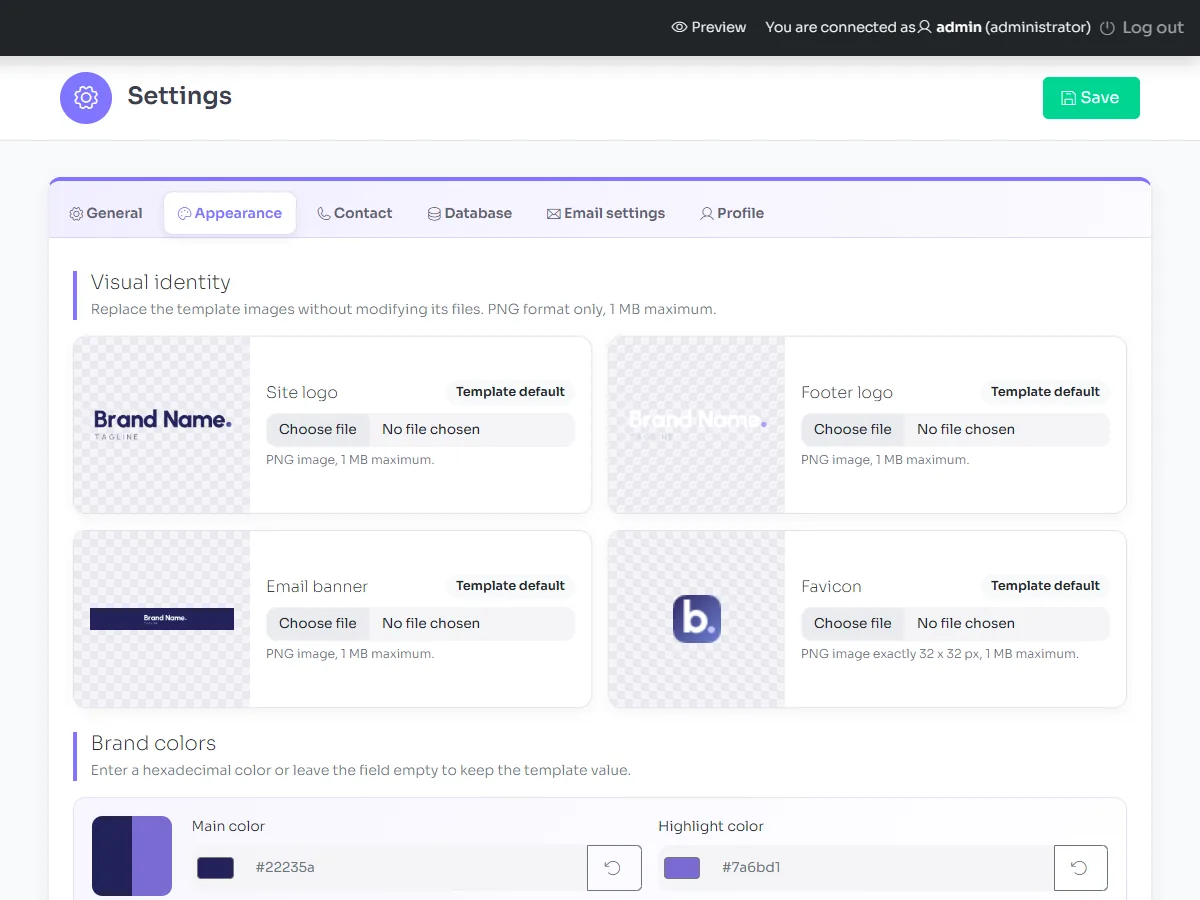
- Visual identity: the site logo, the footer logo (for the dark background), the e-mail banner and the favicon (32 × 32 px), in PNG. Use the template default goes back to the images of the theme.
- Brand colours: the main colour and the highlight colour, which the buttons and banners of the theme follow, gradients included. Left empty, the colours of the theme apply, shown in grey.
The website uses the default theme of Pandao CMS, chosen in Settings › General › Template. To change the theme itself, create a child theme (see Customisation).
Social links, locations & more
- Social links (Configuration › Social links): the icons of your networks, in a column beside the page on wide screens (from 1400 px), in the side menu and in the contact details widget.
- Locations (Configuration › Locations): the places shown on the map of the contact page, with their address and their position. The map needs a Google Maps key (Settings › General).
- Currencies (Configuration › Currencies): the main currency of the prices, and others for extensions that sell.
- Search: Enable search in Settings › General adds a search to the header, with its results page: the pages and articles that hold every word typed, with or without accents, each with a passage of its text.
SEO
- Clean addresses in each language (
/en/features/extensions), with the Alias, Title tag, Description and Robots fields of each page and article. - When an alias changes, the old address redirects to the new one (301), so that links and rankings follow.
- A sitemap (
/sitemap.xml) with the pages and articles of each language, and arobots.txtkept up to date. - A canonical address for each page, from the Public site URL of the settings, and hreflang tags between the translations.
- Light pages: images resized with WebP copies, loaded when they come into view, and no call to an outside library.
- The code of Google Analytics in Settings › General: with the cookie banner, it only runs once the visitor accepts the statistics cookies.
Privacy & security
Privacy
- A cookie banner (Settings › General) with Accept all, Reject all and Customise, as European regulators ask. Its texts are in each language (Configuration › Texts,
COOKIES_*). - A privacy policy page with a model text to complete, which the banner links to, and that extensions complete with their own section.
- Members delete their account themselves from their account page.
Security
- Prepared SQL queries, protection of every form against forged requests, security headers, and routes limited to what exists.
- Passwords hashed with the current algorithms; login attempts limited per address and per account.
- Errors written in the log of the server, never shown to visitors.
- Uploads checked by their content, and media kept in their folders.
- Secret keys are never displayed again once saved.
Maintenance mode
Turn on Maintenance mode in Settings › General while you prepare your site: visitors see a page with your message, and search engines are told to come back later (code 503), while you, logged in to the administration, browse the site as usual.
Trash, drafts & locks
- Deleted items go to the Trash, from which they are restored, or deleted for good.
- A form keeps a draft while you type: closed by mistake, it offers to restore what you wrote.
- An item being edited by someone else is locked for you meanwhile, and says by whom.
Diagnostic
The Diagnostic screen, next to the settings, checks PHP, the database, the server and the scheduled tasks, and says what to ask your host.
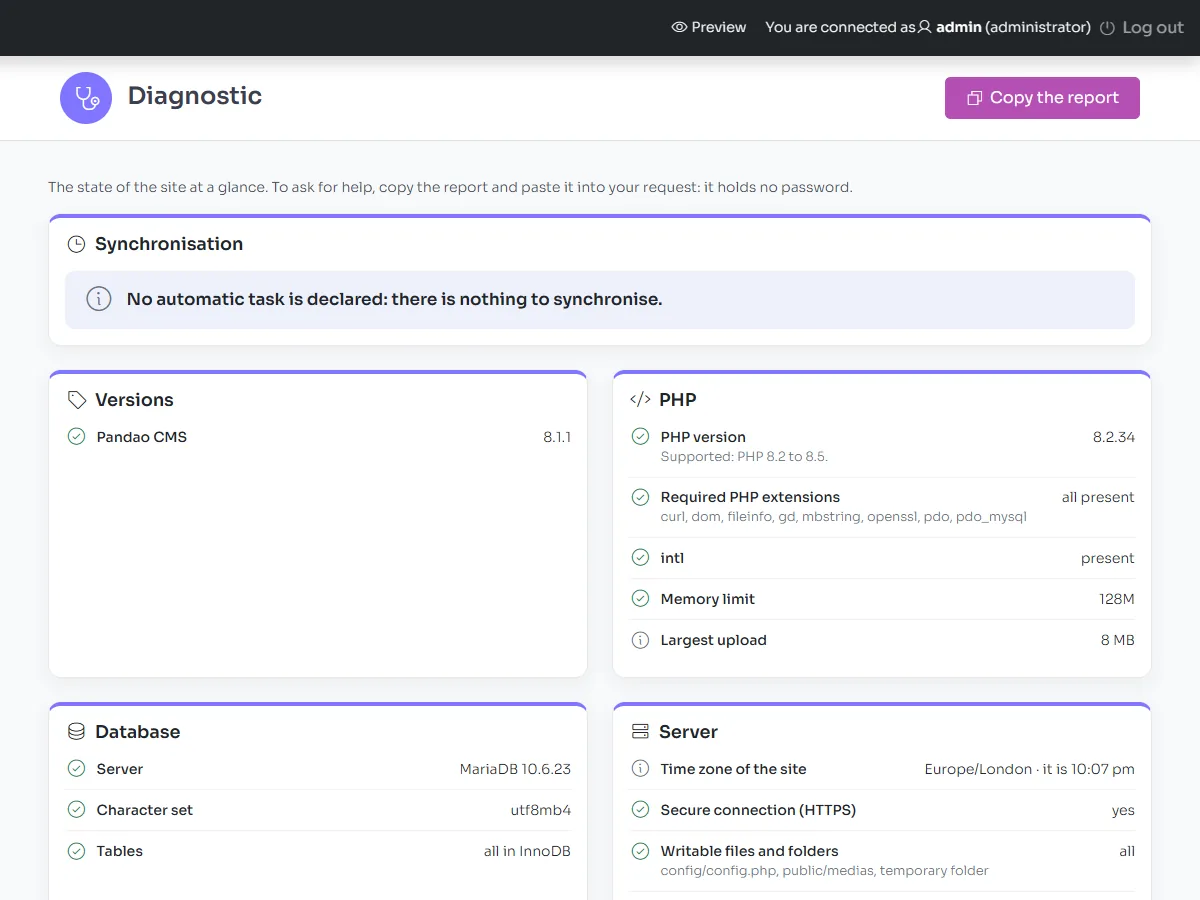
Copy the report copies a report without any password, to join to a request for support.
Scheduled tasks
Pandao CMS runs the scheduled tasks of its extensions: a site without extension has none. When an extension needs them, add a cron job that runs bin/pandao cron every minute: Diagnostic › Advanced configuration shows the exact line for your server, with the path of its PHP. It looks like this:
* * * * * /usr/bin/php /home/your-account/public_html/bin/pandao cron >/dev/null 2>&1Without a cron job, the site runs the tasks itself after a visit, at most every ten minutes, on hosts that use PHP-FPM (most of them).
Customisation
Keep your changes out of the files of the package, so that every update stays a simple upload.
A child theme
A theme is a folder of templates/. A child theme only holds the files it changes: every file it does not have is taken from the default theme.
- Create
templates/my-theme/(lowercase letters, digits, hyphens). - Add your styles in
templates/my-theme/assets/css/custom.css, loaded after the styles of the theme. - To change a template, copy it at the same path from the default theme:
views/partials/header.php,views/partials/footer.php,views/page.php,widgets/featured_home.php… - Choose it in Settings › General › Template.
A copied template no longer receives the improvements of the updates: prefer CSS when it is enough, copy only what you must, and compare your copies with the new versions after an update.
Texts and e-mails need no code: they are edited in the administration.
Extensions
An extension adds a whole feature to the site (a booking engine, a shop, a directory) without touching the files of Pandao CMS, so that each one is updated apart.
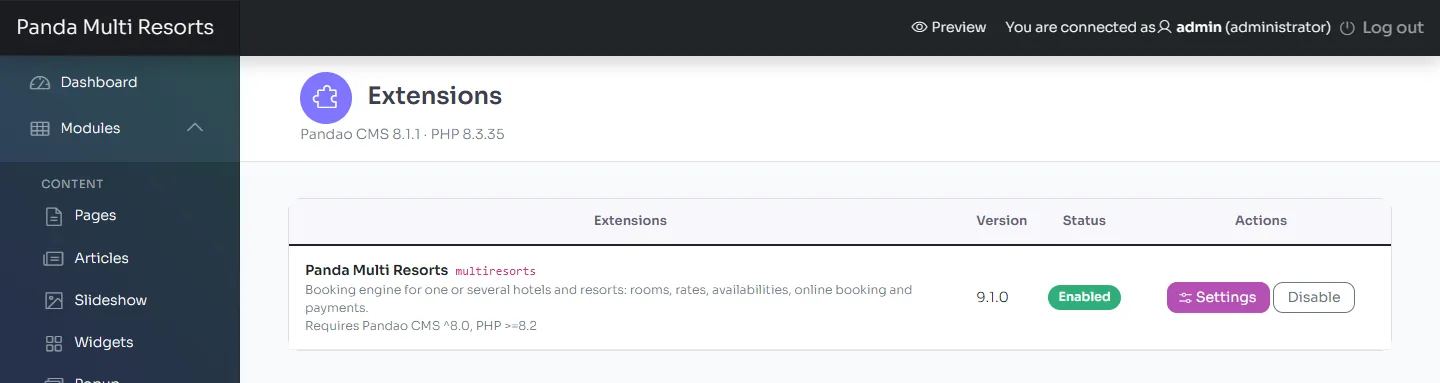
- Upload the folder of an extension into
extensions/, then click Enable in Extensions: its tables are created and its menu appears. - Settings opens its settings, Disable stops it and keeps its data: its pages leave the menus, the sitemap and the search, and its blocks the pages, until it is enabled again.
- New files of an extension wait for Update now, as described in Updating.
- An extension that does not suit the version of Pandao CMS or PHP of the server is shown as Incompatible, and is not loaded.
Add-ons sold for Pandao CMS: Multi Resorts, a complete hotel booking engine for several properties (hotels, rates, online booking and payments, platform calendars), and Panda Resort, the same engine for a single hotel, resort or guest house; both for Pandao CMS 8.2 or later.
Build an extension
An extension is a folder of extensions/, whose name is its identifier (lowercase letters, digits and underscores).
extensions/my_extension/
├── extension.json            its manifest
├── src/Extension.php         Pandao\Extensions\MyExtension\Extension
├── admin/modules/            its modules of the administration
├── admin/langs/              its texts of the administration
├── templates/views/          its pages, which a theme can override
├── public/                   CSS, JS and images, served under /extensions/my_extension/
└── migrations/0001_create_tables.php
{
"name": "my_extension",
"title": "My extension",
"description": "A short text shown in the administration.",
"version": "1.0.0",
"requires": { "pandao": "^8.1", "php": ">=8.2" },
"admin": { "title": "My extension", "icon": "puzzle-piece", "menu": ["item"] }
}The register() method of its Extension class declares what it adds: routes of pages and system routes, XHR actions, screens and actions of the administration with their permission, widgets, settings, roles, scheduled tasks, and hooks (actions and filters) such as front.head, front.footer, admin.dashboard or sitemap.entries. It only declares: it runs at each request, without touching the database.
A migration is a PHP file that returns static function (\PDO $db): void; the migrations run in the order of their numbers, once, at the activation and at each update, and their history is kept. "multilingual": true in the manifest opens a new site in its languages, when the extension ships with Pandao CMS in a package.
Command line
From the folder of the site, with the PHP of the site and its user:
php bin/pandao cron                                # runs the scheduled tasks that are due
php bin/pandao extension:list                      # lists the extensions and their state
php bin/pandao extension:enable my_extension       # enables an extension, as the Extensions page does
php bin/pandao extension:update my_extension       # applies the update of an extension
php bin/pandao extension:disable my_extension      # disables it, and keeps its data
php bin/pandao import:v7 /path/to/old-site         # what a version 7 site holds
php bin/pandao import:v7 /path/to/old-site --run   # imports it into this site
To display the PHP errors while you investigate a problem, add define('PMS_DEBUG', 1); to config/config.php, then remove it: a live site never shows its errors, it writes them in the PHP log of the server.
Troubleshooting & FAQ
Start with the Diagnostic screen: it checks PHP, the database, the server and the scheduled tasks, and says what to ask your host.
The wizard does not open, or every page answers “Not found”
The .htaccess files were not uploaded (they are hidden: show the hidden files in your FTP client), or the server ignores them. Ask your host to turn on mod_rewrite and allow .htaccess files (AllowOverride All). On IIS, URL Rewrite reads the web.config file.
Only the home page opens, the other pages say “No input file specified”
Your host runs PHP as CGI or FastCGI, which refuses the addresses that Pandao CMS 8.2.1 and earlier hand to index.php. Version 8.3.0 fixes it. Until you update, open public/.htaccess and replace its last lines, from RewriteRule ^(.*/)?index\.php$ to the end of the block, with these ones:
    RewriteCond %{THE_REQUEST} ^\S+\s[^?\s]*index\.php[?\s]
    RewriteRule ^(.*/)?index\.php$ %{ENV:BASE}$1 [R=301,L]

    RewriteCond %{REQUEST_FILENAME} !-f
    RewriteCond %{REQUEST_FILENAME} !-d
    RewriteRule ^ index.php [L,QSA]
</IfModule>
A blank page or an “error 500”
Check the version and the extensions of PHP (see Requirements), then the PHP error log of your hosting panel. define('PMS_DEBUG', 1); in config/config.php shows the error for a while.
E-mails do not arrive
Give the SMTP server of your mailbox in Settings › Email settings, with a sender address of your own domain, and look in the spam folder.
The map of the contact page is empty
Give a Google Maps key in Settings › General, and at least one place in Configuration › Locations.
An image looks cut
Set its focal point in the media library: the part of the image you choose stays in view.
A language is missing from the selector
Turn on Enable foreign languages, and publish the language in Configuration › Languages.
An extension is shown as Incompatible
It needs another version of Pandao CMS or of PHP: its line says which. Update Pandao CMS, or ask your host for the version of PHP it needs.
Support
We answer through the Support tab of the page of Pandao CMS on CodeCanyon.
- Item support comes with your purchase for 6 months, and can be extended to 12 months. It covers questions about the features of the product, the fixing of bugs, and help with the third-party assets it includes, as described by the item support policy of Envato. Installation services and customisation are not included.
- To get a quick answer, describe what you did, what you expected and what happened, give the address of the page, and paste the report of the Diagnostic screen (Copy the report). Never send a password in a message.
Credits & licences
Pandao CMS is made by Pandao and sold under the licences of Envato Market. It includes the following resources, each under its own licence. The photos of the online demo, which the screenshots of this guide show, are for preview only and are not included.
| Resource | Licence |
|---|---|
| Sample photos and video | CC0 (StockSnap) and public domain (NASA): docs/CREDITS.md |
| Phosphor Icons | MIT |
| Rubik, Urbanist, Sora (fonts) | SIL Open Font License 1.1 |
| Bootstrap 5, jQuery, jQuery UI | MIT |
| Owl Carousel, Magnific Popup, Animate.css, imagesLoaded, jQuery Appear, jQuery matchHeight, js-cookie, c-share | MIT |
| jQuery Lazy | MIT or GPL-2.0 |
| Bootstrap Star Rating | BSD-3-Clause |
| Isotope | GPL-3.0, or commercial licence of Metafizzy |
| MeanMenu | GPL-3.0 |
| CKEditor 5 (classic text editor of the administration, loaded from its CDN, not included) | GPL-2.0 or later, or commercial licence of CKSource |
| UploadiFive (uploads of the administration) | UploadiFive Standard License |
| PHPMailer | LGPL-2.1 |
Changelog
Version 8.4.1 New
- the installation wizard accepts database names that contain a hyphen, as some hosts create them by adding a suffix to the name you choose (mysite-3a1f9c): it answered “Invalid database name”.
Version 8.4.0
- the page builder is now PageFlow 2: the page is edited as the site shows it, on a computer, a tablet or a phone, with the settings of each block (margins, colours, visibility, column widths for each screen size), ready-made sections, the outline of the page, undo, copy and paste of blocks, and pictures you drop or paste into a page saved straight to the media library; pages made with the previous page builder open as they were;
- removing a picture block from a page no longer deletes its file;
- the sign-up form of the site speaks its language, and says why it refuses a sign-up: a password under 12 characters, a failed anti-robot check, or too many sign-ups in an hour;
- the site keeps a single home page, chosen with the house icon in the list of pages, after a confirmation: before, the red crossed-out eye in that list turned every page you clicked into a home page, and every menu entry then led to the home page;
- the settings now ask for reCAPTCHA v3 keys: with v2 keys, every protected form is refused.
Version 8.3.0
- every page opens on hosts that run PHP as CGI or FastCGI: only the home page did, the others answered “No input file specified”;
- the buttons and banners of the theme follow the highlight colour of Settings › Appearance, gradients included;
- right-to-left languages: the theme loads the right-to-left edition of Bootstrap, and its margins, columns, lists, forms and arrows change side;
- the column of the social links no longer covers the logo or the start of the texts on screens 1400 to 1580 px wide;
- for extensions: a module of a single item opens its form without a list to go back to, and a hidden field of a module form keeps its value without showing.
Version 8.2.1
- a disabled extension leaves no trace on the site: its pages leave the menus, the sitemap and the search, and its blocks leave the pages, title included;
- a block of a type that has nothing to show leaves neither its title nor an empty box;
- “1 comment” in the singular on the blog, and the rating stars of the comments wherever comments show, with their label translated.
Version 8.2.0
The first version 8 of Pandao CMS sold on its own. A new generation for PHP 8.2 to 8.5 (see New in version 8):
- hardened security: rewritten routers, prepared queries, protection of the forms, security headers, limited login attempts;
- extensions, with their pages, modules, widgets, settings, roles, scheduled tasks and database updates, and an Extensions page;
- page builder, form builder, popups, media library with folders, focal points and WebP copies, trash, drafts and editing locks;
- widgets in every position of the theme, evenly spaced on every page, right-to-left languages, a cookie banner with “Reject all”, a privacy policy page;
- a Diagnostic screen, scheduled tasks run by the visits when the server has no cron job, and a command line;
- icons, fonts and sample photos under open licences, and real sample texts in English and French;
- a new site opens in the languages of the extensions shipped with it;
- while an extension waits for its update, the site tells its visitors that it is being updated, and every screen of the administration offers the button;
- the import of a version 7 site, with its content, accounts, media and settings, keeping its addresses (see Upgrading from version 7);
- a search of the site that finds its pages and articles, with or without accents.